Translate

Mostrando las entradas con la etiqueta Windows. Mostrar todas las entradas

viernes, 27 de febrero de 2015


Problem

Sometimes we need to install a second memcached server instance in the same machine (e.g. a developer working in two projects locally and both use memcached).

If we need to install memcached as a service we execute something like this command:

c:/path/to/exe/memcached.exe  -d install


The problem is that we can't run it twice because we will get the following error


So, we got a couple of options:

Category: articles

miércoles, 17 de abril de 2013


Hello guy, first of all, excuse me for my english which is not my mother language.


The first step we need to do when installing Watir is install Ruby. We need to do this because Watir uses Ruby to do his magic.

Installing Ruby


Download the ruby installer  from here. For this tutorial we will use Ruby 1.9.3-p392


Lets install ruby. 


Category: articles

martes, 2 de abril de 2013

En éste tutorial paso a paso con imágenes verás como instalar maven en windows, (para window 8 y 8.1 has click aquí), configurar sus variables de entorno y como comprobar que lo hemos instalado correctamente

Ingresar a la página para descargar maven y selecciona la siguiente versión:


Descomprimimos el .zip que acabamos de descargar, esto nos creará una carpeta con el nombre apache-maven-3.0.5

Podemos ubicar la carpeta apache-maven-3.0.5 donde queramos, en mi caso en p:\

Paga porder utilizar maven necesitaremos tener configuradas dos variables de entorno: MAVEN_HOME  y PATH


Category: articles

martes, 25 de octubre de 2011


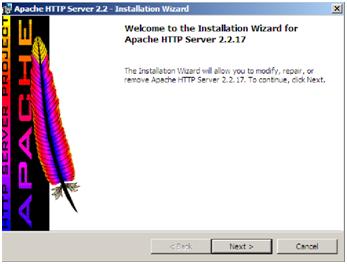
Para nuestro caso utilizaremos el Apache HTTP 2.2.17


Proceso:

·         Instalación de Apache HTTP 2.2.17:
o   Subir el instalador a nuestro servidor y ejecutarlo.

Hacemos click en Next


Escribimos el Dominio, el nombre y el e-mail del administrador del servidor.


Elegimos la opción que más se acomode a lo que queremos hacer, en este caso será la Típica.


Category: articles

Proceso:

·         Instalación de VNC Server:
o   Ejecutar el instalador del programa
o   Seleccionar los ítems correspondientes al servidor VNC


o   Seguir con los pasos del instalador

Category: articles

Proceso:

·         Instalación de telnet:
o   Star>Administrative Tools>Server Manager>Features>add Feature.


o   Seguir el wizard habiendo seleccionado las opciones: Telenet client y Telenet server
·         Activación del servicio:
o   Star>Administrative Tools>Configuration>Services
o   Buscar Telnet>(click derecho) propiedades>Startup type: Automatic.


Category: articles